
AI bookkeeping and BAS
for Australian accounting firms
The AI reads the documents, reconciles the bank, and codes every transaction. Your team reviews and lodges.
Capture-only tools stop at the scanned receipt. Instant Receipts takes it through to a reconciled set of books and a BAS-ready set of figures for every client, in one review queue, with no per-seat pricing.
AI reconciliation and coding
Clients connect their bank, and transactions reach your queue matched to receipts and coded to ATO categories
BAS, GST, TPAR, P&L, Balance Sheet
Every compliance report, per client, from the reviewed data
Unlimited team members
No charge per user, and one shared scan pool
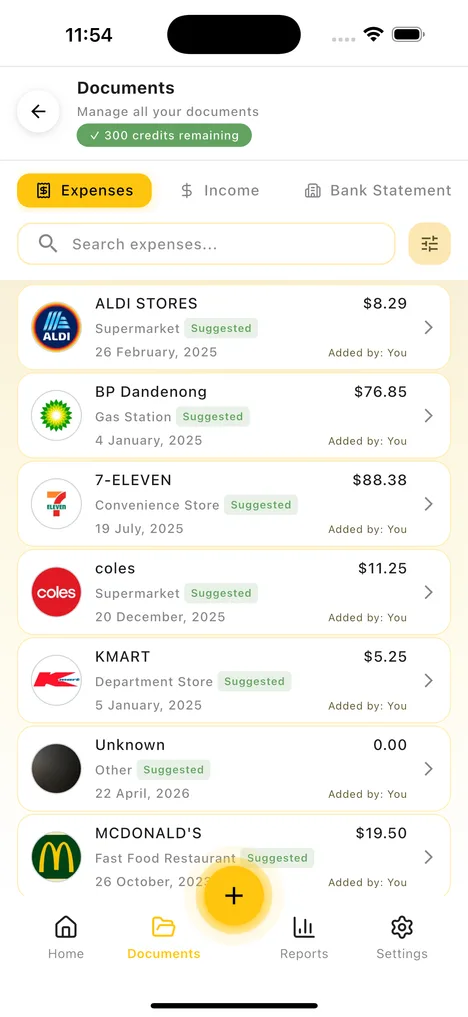
Your clients/team upload docs
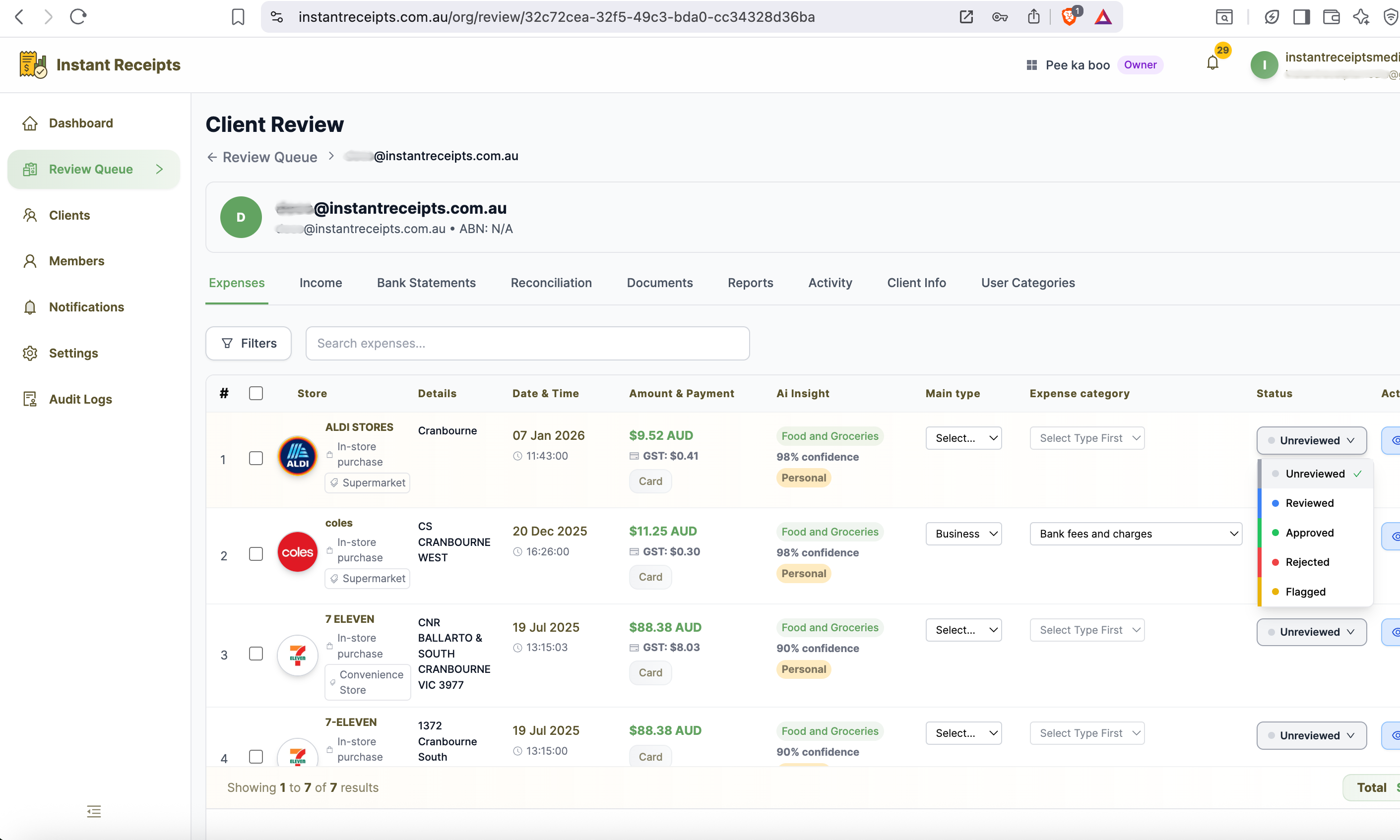
Your approval view
Built for firms that manage client books
One review queue, every ATO report, and no charge per user, whatever kind of practice you run.
Accounting firms
Clients upload their receipts and invoices to their own portal. The AI reads and codes each one, and your team reviews every client from a single queue instead of chasing paperwork.
Bookkeepers
The AI codes transactions to each client's chart of accounts and matches them against the bank feed each client connects (or an uploaded statement), so the books are close to done before you open the file.
BAS and tax agents
Generate a client's BAS Summary, GST report or TPAR with its lodgement file straight from the reviewed data, then lodge through your usual channel.
CPA practices
Every view, edit and approval is logged with a timestamp and a user. Role-based access controls who can see and change each client's records, and all data is hosted in Australia.
In-house finance teams
Run the same review queue across departments or entities. Add as many staff as you need at no extra cost, with scans drawn from one shared pool.
From a client's receipt to a lodged report
Six steps, from the moment your client uploads a document to the point you generate their BAS.
Your client uploads
Clients add their receipts and invoices from their own portal, by mobile app, direct upload or in bulk. You stop chasing them for source documents.
The AI reads and codes it
It pulls the vendor, date, amount, GST and line items, assigns an account from the client's chart of accounts, and applies the GST treatment. Each field comes with a confidence score.
It reconciles against the bank
Clients connect their own bank through Open Banking, and their transactions reach your firm as they sync. The AI matches each one to a receipt or invoice, so the books line up before anyone opens the file.
You review one queue
Open a client and the work is already done. You check the items the AI flagged, across every client, from one queue.
You generate the reports
Produce a client's BAS Summary, GST report, TPAR, P&L or Balance Sheet from the reviewed data, or export it to Xero, MYOB or QuickBooks.
Your whole team, one plan
Assign clients to staff, give each person a role, and add as many team members as you need. Scans come from one shared pool, and there is no charge per user.
Your clients' bank feeds, shared with your firm
Clients connect their own bank through Open Banking, and their transactions flow into your review queue already matched to receipts and invoices. Your accounting or bookkeeping team works from the live data instead of waiting on statements.
1. The client connects once
From their own portal or the mobile app, a client approves read-only access to the accounts they choose, under the Consumer Data Right. They never hand over a banking password and can disconnect at any time.
2. Your firm sees it as it syncs
New transactions appear in that client's file for your team automatically, with the last-synced time alongside. No statements to email, upload or chase at month-end.
3. The AI matches, you review
Each transaction is matched to the client's receipts and invoices. Your team confirms the suggested matches, codes what is left, and feeds a pre-reconciled set of books into BAS and GST reports.
Clients stay in control. Only the client can connect, reconnect or disconnect a bank.
If a client's consent expires, notify them from their file in one click.
Every action your team takes on a client's bank data is in the audit log.
Bank connections are pooled across your clients, with the allowance set by your plan. Open Banking runs under the Consumer Data Right, administered by the ACCC and OAIC, and sharing is only ever with the client's consent.
A look at the actual screens
The parts of Instant Receipts your team will spend the most time in.
Review and approve client expenses
See every client's expenses in one table. Check the AI-extracted data, approve or reject, change a category inline, and move an item from unreviewed to approved without leaving the screen.
The AI does the coding, your team does the review
The AI reads and codes each client's documents and matches them against the bank. Your team reviews the exceptions, then generates whatever report that client needs.
Every report, per client
BAS Summary
Every label, per quarter
GST Collected vs Paid
Sales against purchases
TPAR
With the lodgement file
Profit & Loss
Cash or accrual
Balance Sheet
Point in time
Bank Reconciliation
Matched, ready to review
1. You review the exceptions
Open a client and the coding is done. You check the items the AI flagged, across every client, from one queue.
2. Generate, share, lodge
Produce the BAS Summary, GST report or TPAR, send it to the client on a secure link, and lodge through your usual channel.
Every report as PDF or Excel. Export the underlying data to Xero, MYOB or QuickBooks.
Instant Receipts vs. Dext
Dext captures the receipt. Instant Receipts reconciles it, codes it and builds the report.
Ready to save money and add unlimited team members?
Book a demoOne shared scan pool
Your plan's scans sit in one pool for the whole firm. A client with a heavy month draws more, a quiet client draws less, and nothing is stranded against a per-person limit the way it is with per-seat tools.
What the seats add up to
A firm with 5 team members on a per-seat tool:
Coming from something else?
How Instant Receipts compares to the other ways firms handle client documents.
Instead of Hubdoc
Bundled with Xero, but it only captures documents. No centralised review queue, no per-client credit control, and little reporting.
Full review-and-approve workflow, client management, and ATO reports in one place.
Instead of Expensify
Built for employee expense claims and reimbursements, priced per active user, and US-focused. It is not built around one firm managing many clients' books.
Multi-client dashboard, official ATO categories, BAS / GST / TPAR reporting.
Instead of Spreadsheets & email
Free, until a client sends 40 phone photos of receipts in a shared folder. No audit trail, no GST detection, and hours of manual entry.
AI extraction, a full audit log, and every client in one queue.
Honest and transparent: We are a growing Australian startup. We do not invent user counts or certifications to look bigger than we are, and you can always reach the people who build the product.
Built for client records
How a firm handles client data matters. Here is how Instant Receipts protects it.
No public links to client documents
Client receipts, invoices and statements open through a private link that expires. There is no public URL that can be passed around or picked up by search engines.
Full audit trail
Every view, edit, approval, credit change and team invite is logged with a timestamp and the person who did it. The log is searchable for compliance and quality review.
Australian data residency
Your clients' records stay on Australian servers, encrypted in transit and at rest, and are kept for 5 to 7 years to meet ATO record-keeping rules.
Consent-based bank access
When a client connects their bank the access is read-only and consent-based under Australia's Consumer Data Right. They approve the scope and can disconnect at any time.
Plans for Every Firm Size
Choose the plan that fits your firm's needs. Scale up anytime as you grow. No hidden charges or cancellation fees.
Loading plans…
How organisation billing works
You buy one plan for the firm. Everything below is included, with no charge per user.
Which Plan is Right for You?
Adjust your firm's needs and we'll recommend the perfect plan
Number of Clients
How many clients do you manage?
Docs Per Client/Month
Average receipts uploaded per client monthly
Your Monthly Scan Quota
Scans are pooled across all clients. One client uploading 500 docs does not affect others. It all draws from your shared monthly pool.
Practice
Mid firm ~200 clients
Frequently Asked Questions
Everything you need to know about Instant Receipts for your firm
Give your team one queue and every client's reports
Set up your firm, invite your team and your clients, and start reviewing from one place.